外观
本页尚未翻译
本页内容仍为英文原文,源自官方文档 search/vector-search。中文翻译正在分批进行中。
Vector Search
Search by vector similarity, choose a distance metric and tune your queries.
Applies to: Embedded ✅, Enterprise ✅
Vector search finds similar items by comparing their embeddings: numerical representations of text, images, audio or other data. An embedding model maps related items to nearby points in vector space, so you can search by meaning or similarity instead of matching exact words.
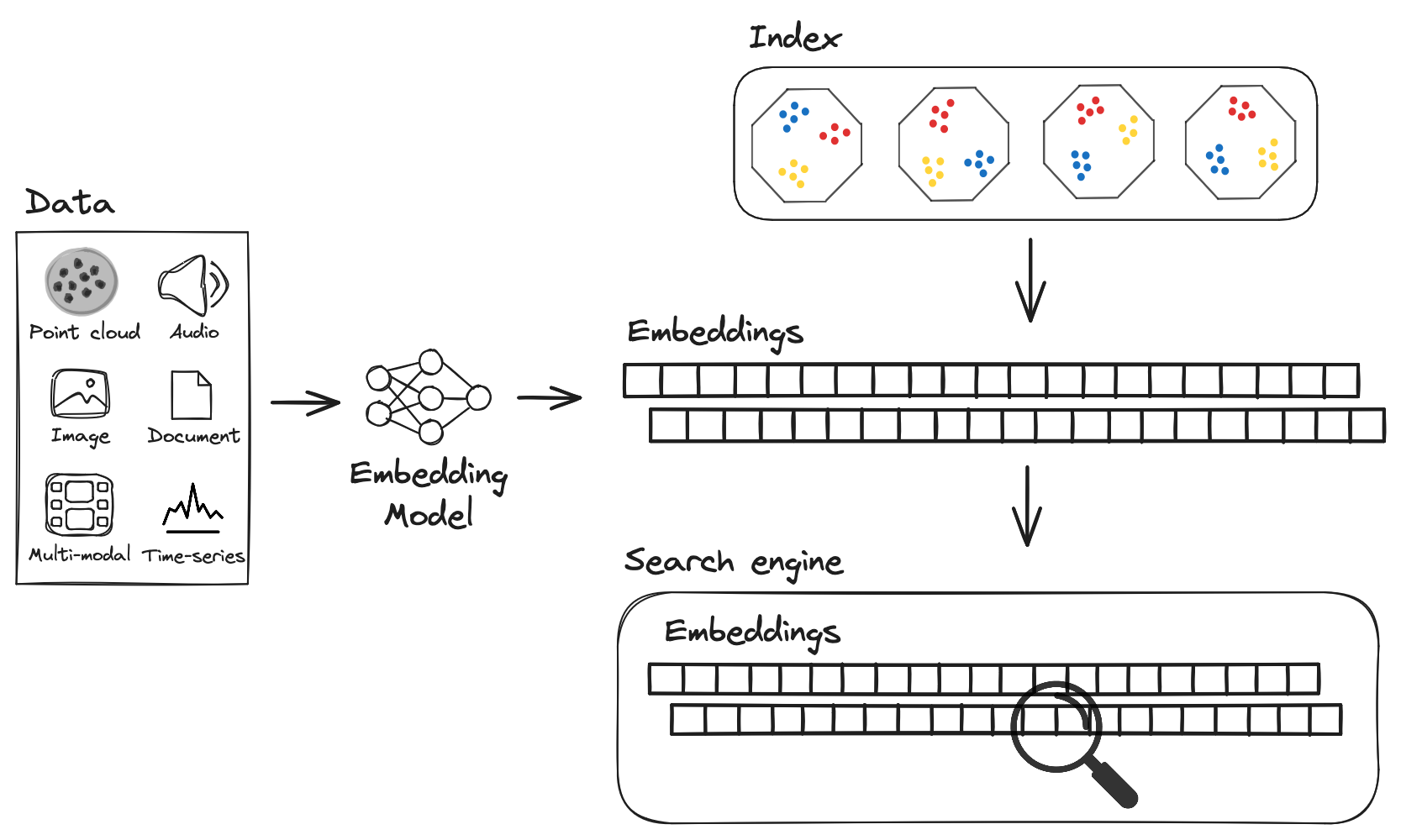
To run a search, pass a query vector to LanceDB and specify how many matches to return. Generate the query vector with the same model and settings used for your stored embeddings. LanceDB ranks the results by distance from the query.
For small tables, you can search the vectors directly. A vector index speeds up searches on larger tables by narrowing the candidates to examine.
Run a complete example in Python, TypeScript or Rust
These examples create a three-row table and find the two closest matches to a query vector. They use hand-written vectors, so you can try the query without an embedding model. The temporary table is removed when the program finishes.
- Python: Install with
pip install lancedb, save asvector_search.py, then runpython vector_search.py. - TypeScript: Install with
npm install @lancedb/lancedb, save asvector_search.mts, then runnode vector_search.mtswith Node.js 22.18 or later. - Rust: Download and extract the complete Rust examples, then run
cargo run --locked --bin vector_searchfrom the extracted directory.
python
table = db.create_table(
    "documents",
    [
        {
            "id": 1,
            "text": "A puppy playing in the park",
            "category": "animals",
            "vector": [1.0, 0.0],
        },
        {
            "id": 2,
            "text": "A dog resting at home",
            "category": "animals",
            "vector": [0.9, 0.1],
        },
        {
            "id": 3,
            "text": "A guide to growing tomatoes",
            "category": "gardening",
            "vector": [0.0, 1.0],
        },
    ],
)
rows = (
    table.search([1.0, 0.0])
    .distance_type("l2")
    .select(["id", "text", "_distance"])
    .limit(2)
    .to_list()
)
print(rows)
typescript
const lancedb = await import("@lancedb/lancedb");
const { mkdtemp, rm } = await import("node:fs/promises");
const { tmpdir } = await import("node:os");
const { join } = await import("node:path");
const uri = await mkdtemp(join(tmpdir(), "lancedb-search-"));
try {
  const db = await lancedb.connect(uri);
  const table = await db.createTable("documents", [
    {
      id: 1,
      text: "A puppy playing in the park",
      category: "animals",
      vector: [1.0, 0.0],
    },
    {
      id: 2,
      text: "A dog resting at home",
      category: "animals",
      vector: [0.9, 0.1],
    },
    {
      id: 3,
      text: "A guide to growing tomatoes",
      category: "gardening",
      vector: [0.0, 1.0],
    },
  ]);
  const rows = await table
    .vectorSearch([1.0, 0.0])
    .distanceType("l2")
    .select(["id", "text", "_distance"])
    .limit(2)
    .toArray();
  console.log(rows);

} finally {
  await rm(uri, { recursive: true, force: true });
}
rust
use arrow_array::types::Float32Type;
use arrow_array::{FixedSizeListArray, Int64Array, RecordBatch, RecordBatchIterator, StringArray};
use arrow_schema::{DataType, Field, Schema};
use futures::TryStreamExt;
use lancedb::query::{ExecutableQuery, QueryBase, Select};
use std::sync::Arc;

#[tokio::main]
async fn main() -> Result<(), Box<dyn std::error::Error>> {
    let directory = tempfile::tempdir()?;
    let db = lancedb::connect(directory.path().to_str().unwrap())
        .execute()
        .await?;
    let schema = Arc::new(Schema::new(vec![
        Field::new("id", DataType::Int64, false),
        Field::new("text", DataType::Utf8, false),
        Field::new("category", DataType::Utf8, false),
        Field::new(
            "vector",
            DataType::FixedSizeList(Arc::new(Field::new("item", DataType::Float32, true)), 2),
            true,
        ),
    ]));
    let batch = RecordBatch::try_new(
        schema.clone(),
        vec![
            Arc::new(Int64Array::from(vec![1, 2, 3])),
            Arc::new(StringArray::from(vec![
                "A puppy playing in the park",
                "A dog resting at home",
                "A guide to growing tomatoes",
            ])),
            Arc::new(StringArray::from(vec!["animals", "animals", "gardening"])),
            Arc::new(
                FixedSizeListArray::from_iter_primitive::<Float32Type, _, _>(
                    [[1.0, 0.0], [0.9, 0.1], [0.0, 1.0]]
                        .into_iter()
                        .map(|v| Some(v.into_iter().map(Some).collect::<Vec<_>>())),
                    2,
                ),
            ),
        ],
    )?;
    let reader = RecordBatchIterator::new(vec![Ok(batch)].into_iter(), schema);
    let table = db
        .create_table(
            "documents",
            Box::new(reader) as Box<dyn arrow_array::RecordBatchReader + Send>,
        )
        .execute()
        .await?;
    let query = table
        .vector_search(&[1.0_f32, 0.0])?
        .distance_type(lancedb::DistanceType::L2)
        .select(Select::columns(&["id", "text", "_distance"]))
        .limit(2);
    let rows: Vec<RecordBatch> = query.execute().await?.try_collect().await?;
    println!("{rows:?}");

    Ok(())
}
The first result is the puppy record, whose vector exactly matches the query. The dog record is next. _distance is smaller for closer matches. This example uses an exhaustive scan; the indexing section explains how to search larger tables.
Supported distance metrics
A distance metric determines how LanceDB compares vectors. Choose the metric recommended by your embedding model. Use the same metric when building an index and querying it.
LanceDB supports l2, cosine, dot and hamming. An unindexed search uses l2 by default; Hamming distance is for binary vectors. The table below shows the value returned in the _distance column. Smaller values rank first.
| Distance metric | Mathematical form | Notes |
|---|---|---|
l2 | $\sum_i (x_i-y_i)^2$ | Squared Euclidean distance returned in _distance. |
cosine | $1-\frac{x\cdot y}{|x|_2|y|_2}$ | Measures directional difference between vectors. Insensitive to nonzero scaling of vectors. |
dot | $1-\sum_i x_i y_i$ | Dot-product distance. For unit-normalized vectors, this equals cosine distance. |
hamming | $\underset{i}{\sum} ,: \mathbf{1}_{, [x_i\neq y_i]}$ | Counts the number of bitwise-differing bits between binary vectors. |
For indexed search, supported distance metrics vary by index type:
| Index type | Supported distance metrics |
|---|---|
IVF_FLAT | ["l2", "cosine", "dot", "hamming"] |
IVF_PQ | ["l2", "cosine", "dot"] |
IVF_SQ | ["l2", "cosine", "dot"] |
IVF_RQ | ["l2", "cosine", "dot"] |
IVF_HNSW_FLAT | ["l2", "cosine", "dot"] |
IVF_HNSW_PQ | ["l2", "cosine", "dot"] |
IVF_HNSW_SQ | ["l2", "cosine", "dot"] |
Configure Distance Metric
Without a vector index, searches use l2 by default. You can specify cosine or dot instead (hamming is supported for IVF_FLAT indexes only).
When a vector index exists, the search metric must match the metric used to build the index. If you explicitly request a different metric, LanceDB cannot use that index and falls back to an exhaustive (brute-force) search. On LanceDB Cloud (legacy hosted service), the brute-force KNN safety limit can reject that search on a large table instead of executing it. LanceDB Enterprise doesn't have the limit.
If you omit the search metric, current SDKs use the index metric when an index is available. Some older SDK versions sent l2 when the metric was omitted; with a non-l2 index, explicitly set the matching metric or upgrade the SDK.
python
tbl.search(np.random.random((1536))).distance_type("cosine").limit(10).to_list()typescript
const results2 = await (
  tbl.search(Array(128).fill(1.2)) as lancedb.VectorQuery
)
  .distanceType("cosine")
  .limit(10)
  .toArray();
rust
// Use the same distance metric the index was trained with.
let mut results = table
    .vector_search(&query_vector)?
    .distance_type(DistanceType::Cosine)
    .limit(10)
    .execute()
    .await?;
while let Some(batch) = results.try_next().await? {
    println!("{:?}", batch);
}
These examples use cosine distance and return up to ten matches. If the table has a vector index, build it with the same metric.
Set .limit(...) on vector searches you run in applications. You can page through results with .offset(...) and include LanceDB's internal row id with .with_row_id() / .withRowId() when an operation requires internal row IDs. Use your own ID column for application identifiers.
Selecting the vector column
If your table has exactly one vector column, you can omit the column name and LanceDB will pick it for you. This works for both top-level columns (such as vector) and vector fields nested inside a struct (such as image.embedding).
When LanceDB can't infer a single column, it raises a ValueError (Python) or rejects the query (Node/Rust). Two cases trigger this:
- No vector column: the schema has no
fixed_size_listorlistof floats. - Multiple candidates: more than one column matches the query's dimension. The error lists every candidate path so you can pick one explicitly.
To disambiguate, pass the field path with dot notation. Wrap any segment that contains characters outside [A-Za-z0-9_] in backticks (for example, `image-meta`.`embedding.v1`).
python
import pyarrow as pa

schema = pa.schema([
    pa.field("id", pa.int32()),
    pa.field(
        "image",
        pa.struct([pa.field("embedding", pa.list_(pa.float32(), 2))]),
    ),
])
table = db.create_table(
    "nested",
    data=[{"id": 0, "image": {"embedding": [0.0, 1.0]}}],
    schema=schema,
)

# Inferred: the only vector leaf is `image.embedding`.
table.search([0.0, 1.0]).limit(1).to_list()

# Explicit: required when more than one vector column matches.
table.search([0.0, 1.0], vector_column_name="image.embedding").limit(1).to_list()
typescript
const table = await db.openTable("nested");

// Inferred: LanceDB finds the single nested vector leaf automatically.
await table.query().nearestTo([0.0, 1.0]).limit(1).toArray();

// Explicit: required when more than one vector column matches.
await table
  .query()
  .nearestTo([0.0, 1.0])
  .column("image.embedding")
  .limit(1)
  .toArray();
The same field-path syntax works when creating an index on a nested vector column:
python
table.create_index(vector_column_name="image.embedding")typescript
await table.createIndex("image.embedding");When several columns share a name across structs (for example, image.embedding and text.embedding), LanceDB still picks the one whose dimension matches your query vector. If two candidates have the same dimension, you must pass the column name explicitly.
Search with a vector index
An approximate nearest-neighbor (ANN) index narrows the set of vectors examined for a query. It can reduce query latency, but may miss neighbors that an exhaustive search would find. Compare recall and latency on queries that represent your application before choosing an index and its search settings.
注意
When a vector index is used, _distance is not always the true distance between full vectors. On quantized ANN indexes, LanceDB may compute _distance from the compressed representation for speed. Use refine_factor when you want reranking on full vectors.
Exact vs Approximate Distances
When doing vector search, the meaning of "distance" depends on whether you are using an index and whether refine_factor is specified as part of your query. nprobes controls how many partitions are searched to find candidates, approx_mode controls the query-time speed/recall trade-off for RQ-quantized and filtered HNSW indexes, and refine_factor controls how many candidates are rescored on full vectors for better distance fidelity and reranking quality.
The table below summarizes the behavior of _distance in search results based on your query configuration:
| Query mode | Neighbor quality | _distance in results |
|---|---|---|
No index or .bypass_vector_index() | Exact kNN (100% recall) | True distance on full vectors |
Indexed ANN, no refine_factor | Approximate neighbors | Distance on the index representation: exact for flat indexes, approximate for quantized indexes |
Indexed ANN + refine_factor(1) | Approximate neighbors (same candidate set) | Distances recomputed on full vectors for reranked candidates |
Indexed ANN + refine_factor(>1) | Better recall than no refine (usually) | Distances recomputed on full vectors for reranked candidates |
python
# Indexed ANN search without refinement (fast, approximate `_distance`)
fast_results = (
    table.search(embedding)
    .limit(10)
    .to_pandas()
)

# Recompute distances on full vectors for reranked candidates
exact_distance_results = (
    table.search(embedding)
    .limit(10)
    .refine_factor(1)
    .to_pandas()
)

# Rerank a larger candidate set for better recall (higher latency)
higher_recall_results = (
    table.search(embedding)
    .limit(10)
    .refine_factor(20)
    .to_pandas()
)
typescript
// Indexed ANN search without refinement (fast, approximate `_distance`)
const fastResults = await (table.search(embedding) as lancedb.VectorQuery)
  .limit(10)
  .toArray();

// Recompute distances on full vectors for reranked candidates
const exactDistanceResults = await (
  table.search(embedding) as lancedb.VectorQuery
)
  .limit(10)
  .refineFactor(1)
  .toArray();

// Rerank a larger candidate set for better recall (higher latency)
const higherRecallResults = await (
  table.search(embedding) as lancedb.VectorQuery
)
  .limit(10)
  .refineFactor(20)
  .toArray();
rust
// Approximate ANN search (fast, distances may come from the index representation)
let mut fast_results = table.vector_search(&query_vector)?.limit(10).execute().await?;
while let Some(batch) = fast_results.try_next().await? {
    println!("{:?}", batch);
}

// Rerank a larger candidate set on full vectors for better recall
let mut refined_results = table
    .vector_search(&query_vector)?
    .limit(10)
    .refine_factor(20)
    .execute()
    .await?;
while let Some(batch) = refined_results.try_next().await? {
    println!("{:?}", batch);
}
See vector indexes for index configuration. The following sections cover query-time settings.
Tuning approx_mode
Use approx_mode when you want to adjust the speed/recall trade-off for approximate vector search at query time. It applies to RQ-quantized indexes, such as IVF_RQ, and to filtered searches on HNSW indexes. Other index types, and queries that bypass the index, ignore it.
The supported values are:
| Value | Behavior |
|---|---|
fast | Prefer lower query latency, which can reduce recall. |
normal | Use the default balance between query latency and recall. For RQ indexes built with num_bits=1, this uses the same one-bit scoring path as fast. |
accurate | Prefer higher recall, which can increase query latency. |
approx_mode defaults to normal and can change per query without rebuilding the index. The Python and Rust APIs call it approx_mode, and the TypeScript API calls it approxMode. On HNSW, fast enables ACORN traversal only when a filter leaves a non-trivial subset of rows; unfiltered or all-row searches use the regular traversal, and very selective filters may use an exact scan instead. If you also set refine_factor, LanceDB first uses approx_mode while finding candidates, then reranks the selected candidates on full vectors.
Tuning nprobes
For IVF vector indices, start with Auto by leaving the probe settings unset. LanceDB chooses how many partitions to search to balance recall and latency. It can search further if a filter leaves too few results, within any limits you set.
The examples below assume table has an IVF index and query_vector uses the same embedding model and dimension as its vectors.
python
# Start with Auto.
auto = table.search(query_vector).limit(10).to_arrow()
Adjust speed and recall
Use search_effort to tune how much work a search does. It accepts values from 0 to 1; 0.5 uses Auto. Increase it to search more partitions when recall is too low, or decrease it when you can trade some recall for lower latency. search_effort(0.95) does not mean 95% recall.
python
# Search more partitions to try to improve recall.
higher_effort = table.search(query_vector).search_effort(0.75).limit(10).to_arrow()
Measure the effect on your queries. Higher effort may add latency without improving recall. With no maximum set, search_effort(1) searches all partitions and can be expensive. In TypeScript, the method is named searchEffort.
Set probe limits
Use explicit probe counts when you have measured a suitable range for your workload:
| Parameter | When to use it |
|---|---|
minimum_nprobes | Set a lower bound on how many partitions to search. Auto may search more from the start. |
maximum_nprobes | Cap the number of partitions searched, including additional searches needed to fill the result count. A low cap can reduce recall or return fewer results than requested. |
nprobes | Search a fixed number of partitions instead of using Auto. Useful for comparing settings in a benchmark. |
Counts apply per index segment, not to the entire query. With many segments, more probes can mean substantially more data reads and cache-fill writes. A probe cap is not a limit on total latency or I/O.
Use positive counts and keep the minimum no larger than the maximum. Leave the maximum unset to allow further searching as needed. If filtered queries return too few results, raise or remove that cap; see the bounded-search example.
python
# Use a fixed probe count.
fixed = table.search(query_vector).nprobes(20).limit(10).to_arrow()
Prefer choosing either effort or a fixed count. If both are set, explicit search_effort overrides nprobes. Explicit min/max bounds still apply; setting them equal fixes the count.
Check result quality
Auto was tuned toward roughly 95% average recall in benchmark tests. That is a starting point, not a guarantee for your data or every query. Returning k results also does not mean they are the true nearest k neighbors.
Measure recall on representative queries against an exact search with the same metric and filter. Test the settings you intend to use: an Auto search capped at 50 probes can search fewer partitions than fixed nprobes(50), so the two can have different recall.
If more probes stop improving quality, try increasing refine_factor or using a higher-precision index. More probes do not remove quantization error, and refinement can only rerank the candidates the search finds.
说明
The Python examples use APIs available in LanceDB 0.41.0. Remote queries need server support too. Older clients may send fixed probe settings by default; upgrading the server alone does not switch those requests to Auto.
Auto's calibration covers l2, cosine and dot searches up to k=100000. For Hamming or larger requests, measure quality and latency on your workload before relying on the defaults.
Vector Search with Prefiltering
This is the default vector search setting. You can use prefiltering to boost query performance by reducing the search space before vector calculations begin. The system first applies your filter criteria to the dataset, then conducts vector search operations only on the remaining relevant subset.
python
from datasets import load_dataset

# Load query vector from dataset
query_dataset = load_dataset("sunhaozhepy/ag_news_sbert_keywords_embeddings", split="test[5000:5001]")
print(f"Query keywords: {query_dataset[0]['keywords']}")
query_embed = query_dataset["keywords_embeddings"][0]

# Open table and perform search
table_name = "lancedb-enterprise-quickstart"
table = db.open_table(table_name)

# Vector search with filters (pre-filtering is the default)
search_results = (
    table.search(query_embed)
    .where("label > 2")
    .select(["text", "keywords", "label"])
    .limit(5)
    .to_pandas()
)

print("Search results (with pre-filtering):")
print(search_results)
typescript
// Generate a sample 768-dimension embedding vector (typical for BERT-based models)
// In real applications, you would get this from an embedding model
const dimensions = 768;
const queryEmbed = Array.from(
  { length: dimensions },
  () => Math.random() * 2 - 1,
);

// Open table and perform search
const tableName = "lancedb-enterprise-quickstart";
const table = await db.openTable(tableName);

// Vector search with filters (pre-filtering is the default)
const vectorResults = await table
  .search(queryEmbed)
  .where("label > 2")
  .select(["text", "keywords", "label"])
  .limit(5)
  .toArray();

console.log("Search results (with pre-filtering):");
console.log(vectorResults);
rust
// Prefiltering is the default: the filter is applied before vector search.
let mut results = table
    .vector_search(&query_vector)?
    .only_if("id > 100")
    .select(Select::columns(&["id"]))
    .limit(5)
    .execute()
    .await?;
while let Some(batch) = results.try_next().await? {
    println!("{:?}", batch);
}
The filter limits which rows can match. Use select() to choose the returned columns and limit() to set the maximum number of results.
Vector Search with Postfiltering
Postfiltering selects vector-search candidates before applying the metadata predicate. It can return fewer matches than requested, even when other rows in the table satisfy the predicate. Use prefiltering when you want the nearest records within the matching subset.
python
results_post_filtered = (
    table.search(query_embed)
    .where("label > 1", prefilter=False)
    .select(["text", "keywords", "label"])
    .limit(5)
    .to_pandas()
)

print("Vector search results with post-filter:")
print(results_post_filtered)
typescript
const vectorResultsWithPostFilter = await (
  table.search(queryEmbed) as lancedb.VectorQuery
)
  .where("label > 2")
  .postfilter()
  .select(["text", "keywords", "label"])
  .limit(5)
  .toArray();

console.log("Vector search results with post-filter:");
console.log(vectorResultsWithPostFilter);
rust
// Apply the filter after vector search by calling postfilter().
let mut results = table
    .vector_search(&query_vector)?
    .only_if("id > 100")
    .postfilter()
    .select(Select::columns(&["id"]))
    .limit(5)
    .execute()
    .await?;
while let Some(batch) = results.try_next().await? {
    println!("{:?}", batch);
}
Only retrieved candidates that satisfy the predicate remain in the result. Increase the candidate limit or use prefiltering if too few records are returned.
[card]
Post-filtering in LanceDB applies the filter condition after obtaining the nearest neighbors based on vector similarity.
Multivector Search
Use multivector search when your documents contain multiple embeddings and you need sophisticated matching between query and document vector pairs. The late interaction approach finds the most relevant combinations across all available embeddings and provides nuanced similarity scoring.
python
query_multi = np.random.random(size=(2, 256))
results_multi = tbl.search(query_multi).limit(5).to_pandas()
Here you can see how to take 2 query vectors and find the best matching pairs between them and document vectors using late interaction. The np.random.random(size=(2, 256)) creates a 2×256 array with two random query vectors, .limit(5) returns the top 5 best document-query combinations, and .to_pandas() provides results in a DataFrame format.
For the supported metric, how scoring works and a complete example, see the multivector search walkthrough.
Advanced Search Scenarios
Search With Distance Range
Use distance_range search when you need vectors within particular similarity bounds rather than just the closest neighbors. The system filters results to only include vectors that fall within your specified distance thresholds from the query.
python
query = np.random.random(256)

# Search for the vectors within the range of [0.1, 0.5)
tbl.search(query).distance_range(0.1, 0.5).to_arrow()

# Search for the vectors with the distance less than 0.5
tbl.search(query).distance_range(upper_bound=0.5).to_arrow()

# Search for the vectors with the distance greater or equal to 0.1
tbl.search(query).distance_range(lower_bound=0.1).to_arrow()
typescript
const results3 = await (
  tbl.search(Array(128).fill(1.2)) as lancedb.VectorQuery
)
  .distanceType("cosine")
  .distanceRange(0.1, 0.2)
  .limit(10)
  .toArray();
rust
// Only return rows whose distance falls within [0.1, 0.5).
let mut results = table
    .vector_search(&query_vector)?
    .distance_range(Some(0.1), Some(0.5))
    .execute()
    .await?;
while let Some(batch) = results.try_next().await? {
    println!("{:?}", batch);
}
This shows three ways to search within distance ranges: bounded, upper bound only, and lower bound only.
The distance_range() method filters results by similarity thresholds - the first example finds vectors with distance between 0.1 and 0.5, the second finds vectors closer than 0.5, and the third finds vectors farther than 0.1.
Each approach returns Arrow tables with vectors that fall within your specified distance thresholds.
Search With Binary Vectors
Use binary vector search for scenarios involving binary embeddings, such as those produced by hashing algorithms. The system stores these efficiently as packed uint8 arrays and uses Hamming distance calculations to determine vector similarity.
提示
The number of dimensions of the binary vector must be a multiple of 8. A vector of dimensionality 128 will be stored as a uint8 array of size 16.
python
import numpy as np
import pyarrow as pa

schema = pa.schema(
    [
        pa.field("id", pa.int64()),
        # for dim=256, lance stores every 8 bits in a byte
        # so the vector field should be a list of 256 / 8 = 32 bytes
        pa.field("vector", pa.list_(pa.uint8(), 32)),
    ]
)
tbl = db.create_table("my_binary_vectors", schema=schema)

data = []
for i in range(1024):
    vector = np.random.randint(0, 2, size=256)
    # pack the binary vector into bytes to save space
    packed_vector = np.packbits(vector)
    data.append(
        {
            "id": i,
            "vector": packed_vector,
        }
    )
tbl.add(data)

query = np.random.randint(0, 2, size=256)
packed_query = np.packbits(query)
tbl.search(packed_query).distance_type("hamming").to_arrow()
typescript
const tbl = await db.createTable("binary_vectors", data, {
  mode: "overwrite",
});
await tbl.createIndex("vector", {
  config: lancedb.Index.ivfFlat({
    numPartitions: 10,
    distanceType: "hamming",
  }),
});

const query = Array(32)
  .fill(1)
  .map(() => Math.floor(Math.random() * 255));
const results = await tbl.query().nearestTo(query).limit(10).toArray();
rust
// Binary vectors use `hamming` distance over the packed uint8 bytes.
let query: Arc<dyn Array> = Arc::new(UInt8Array::from(vec![1u8; NUM_BYTES as usize]));
let mut results = tbl
    .vector_search(query)?
    .distance_type(DistanceType::Hamming)
    .limit(10)
    .execute()
    .await?;
while let Some(batch) = results.try_next().await? {
    println!("{:?}", batch);
}
Here you can see how to set up a table for binary vectors, pack them efficiently into bytes, and search using Hamming distance.
The schema defines a 32-byte vector field (256 bits ÷ 8), np.random.randint(0, 2, size=256) creates binary vectors, np.packbits() compresses them to bytes, and .distance_type("hamming") specifies hamming distance for similarity calculation.
The search produces an Arrow table with binary vectors ranked by how many bits differ from the query.
Scaling Vector Search
Query multiple vectors in a batch
Batch search accepts multiple query vectors in one request. The query_index column identifies which query produced each result. Measure throughput and latency with your workload when choosing a batch size.
python
# Load a batch of query embeddings
query_dataset = load_dataset(
    "sunhaozhepy/ag_news_sbert_keywords_embeddings", split="test[5000:5005]"
)
query_embeds = query_dataset["keywords_embeddings"]
batch_results = table.search(query_embeds).limit(5).to_pandas()
print(batch_results)
typescript
// Batch query
console.log("Performing batch vector search...");
const batchSize = 5;
const queryVectors = Array.from({ length: batchSize }, () =>
  Array.from({ length: dimensions }, () => Math.random() * 2 - 1),
);
let batchQuery = table.search(queryVectors[0]) as lancedb.VectorQuery;
for (let i = 1; i < batchSize; i++) {
  batchQuery = batchQuery.addQueryVector(queryVectors[i]);
}
const batchResults = await batchQuery
  .select(["text", "keywords", "label"])
  .limit(5)
  .toArray();
console.log("Batch vector search results:");
console.log(batchResults);
rust
// Search multiple query vectors in one call. Each result row carries a
// `query_index` mapping it back to the query it matched.
let mut results = table
    .vector_search(&query_1)?
    .add_query_vector(&query_2)?
    .limit(5)
    .execute()
    .await?;
while let Some(batch) = results.try_next().await? {
    println!("{:?}", batch);
}
Each input vector has its own nearest-neighbor results. Use query_index to associate each row with the corresponding input vector.
Include or skip unindexed rows
To optimize for speed over completeness, enable the fast_search flag in your query to skip searching unindexed data.
By default, search includes both indexed vectors and unindexed rows visible to the query. LanceDB scans the unindexed rows directly. fast_search skips that scan, which can reduce query time but omit recent records.
python
table.search(embedding, fast_search=True).limit(5).to_pandas()typescript
await table
  .query()
  .nearestTo(embedding)
  .fastSearch()
  .limit(5)
  .toArray();
rust
// Skip unindexed data for lower latency.
let mut results = table
    .vector_search(&query_vector)?
    .fast_search()
    .limit(5)
    .execute()
    .await?;
while let Some(batch) = results.try_next().await? {
    println!("{:?}", batch);
}
Use this option only when results from indexed data are sufficient.
Expected performance at scale
Enterprise
At 1 billion rows, LanceDB Enterprise reaches p50 28 ms and p99 58 ms on fully cached data with no custom tuning -- a representative floor to plan around, not a ceiling. Measured with 1,536-dimensional embeddings, an IVF-RQ index, nprobe=8, k=100, on the best-performing configuration tested at that scale. The exact numbers depend on your deployment's shape (cluster size, storage class, dataset); for higher performance, talk to the sales team.
Search without a vector index
Search With No Index
The simplest way to perform vector search is to perform a brute force search, without an index, where the distance between the query vector and all the vectors in the database are computed, with the top-k closest vectors returned.
This is equivalent to a k-nearest neighbours (kNN) search in vector space.
Choose brute force search when you need guaranteed 100% recall, typically with smaller datasets where query speed isn't the primary concern. The system scans every vector in the table and calculates precise distances to find the exact nearest neighbors.
python
tbl.search(np.random.random((1536))).limit(3).to_list()typescript
const tbl = await db.openTable("my_vectors");

const results1 = await tbl.search(Array(128).fill(1.2)).limit(3).toArray();
rust
// A plain vector search returns the top-k closest rows.
let mut results = table.vector_search(&query_vector)?.limit(3).execute().await?;
while let Some(batch) = results.try_next().await? {
    println!("{:?}", batch);
}
These queries return the three nearest matches. Without a vector index, LanceDB calculates distances directly from the stored vectors.
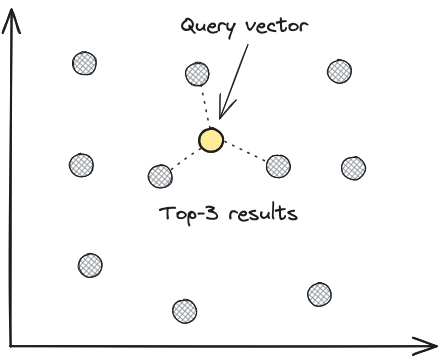
Exhaustive search does more work as the table grows. When query latency becomes too high, add an ANN index and compare its results with the exhaustive baseline.
Bypass the Vector Index
Use bypass_vector_index to get exact, ground-truth results by performing exhaustive searches across all vectors. Instead of relying on approximate methods, the system directly compares your query against every vector in the table, ensuring 100% recall at the cost of increased query time.
python
table.search(embedding).bypass_vector_index().limit(5).to_pandas()typescript
await table
  .query()
  .nearestTo(embedding)
  .bypassVectorIndex()
  .limit(5)
  .toArray();
rust
// Force an exhaustive (flat) scan for exact, ground-truth results.
let mut results = table
    .vector_search(&query_vector)?
    .bypass_vector_index()
    .limit(5)
    .execute()
    .await?;
while let Some(batch) = results.try_next().await? {
    println!("{:?}", batch);
}
This skips the approximate index and checks every single vector for exact, ground-truth results.
The .bypass_vector_index() method forces LanceDB to perform an exhaustive search through all vectors instead of using the approximate nearest neighbor index, ensuring exact results but at the cost of slower performance.
The query returns the nearest five rows within its filters and distance bounds. Use an exhaustive scan as a baseline when measuring ANN recall.
This approach is particularly useful when:
- Evaluating ANN index quality
- Calculating recall metrics to tune index parameters
- Ensuring exact results for critical applications
Multivector search walkthrough
LanceDB's multivector support enables you to store and search multiple vector embeddings for a single item.
This capability is particularly valuable when working with late-interaction models like ColBERT and ColPaLi, which generate multiple embeddings per document.
In this tutorial, you'll create a table with multiple vector embeddings per document and learn how to perform multivector search. For more end-to-end examples, see the VectorDB recipes repository.
Multivector Support
Each item in your dataset can have a column containing multiple vectors, which LanceDB can efficiently index and search. When performing a search, you can query with either a single vector embedding or multiple vector embeddings.
注意
Currently, only the cosine metric is supported for multivector search. The vector value type can be float16, float32, or float64.
Each query vector must match the inner vector dimension in the multivector column. This applies to both single-vector queries and multi-vector query matrices.
Computing Similarity
MaxSim (Maximum Similarity) is a key concept in late-interaction models that:
- Computes the maximum similarity between each query embedding and all document embeddings
- Sums these maximum similarities to get the final relevance score
- Effectively captures fine-grained semantic matches between query and document tokens
The MaxSim calculation can be expressed as:
$$ \text{MaxSim}(Q, D) = \sum_{i=1}^{|Q|} \max_{j=1}^{|D|} \text{sim}(q_i, d_j) $$
Where $sim$ is the similarity function (e.g., cosine similarity).
$$ Q = {q_1, q_2, ..., q_{|Q|}} $$
$Q$ represents the query embeddings, and $D = {d_1, d_2, ..., d_{|D|}}$ represents the document embeddings.
Using Multivector Search
1. Setup
Connect to a local LanceDB database and import the required libraries.
python
import numpy as np
import pyarrow as pa

db = lancedb.connect("data/multivector_demo")
说明
To run this walkthrough on LanceDB Enterprise, connect with lancedb.connect(uri="db://your-database", api_key="your-api-key", region="your-region") instead. The remaining steps are the same.
2. Define Schema
Define a schema that specifies a multivector field. A multivector field is a nested list structure in which each document contains multiple vectors. In this case, we'll create a schema with:
- An ID field as an integer (int64)
- A vector field that is a list of lists of float32 values
- The outer list represents multiple vectors per document
- Each inner list is a 256-dimensional vector
- Using float32 for memory efficiency while maintaining precision
python
schema = pa.schema(
    [
        pa.field("id", pa.int64()),
        # float16, float32, and float64 are supported
        pa.field("vector", pa.list_(pa.list_(pa.float32(), 256))),
    ]
)
3. Generate Multivectors
Generate sample data where each document contains multiple vector embeddings, which can represent different aspects or views of the same document.
In this example, we create 1024 documents where each document has 2 random vectors of dimension 256, simulating a real-world scenario where you might have multiple embeddings per item.
python
data = [
    {
        "id": i,
        "vector": np.random.random(size=(2, 256)).tolist(),  # Each document has 2 vectors
    }
    for i in range(1024)
]
4. Create a Table
Create a table with the defined schema and sample data, which will store multiple vectors per document for similarity search.
python
tbl = db.create_table("multivector_example", data=data, schema=schema)5. Build an Index
Only cosine similarity is supported for multivector search operations. For faster search, build the standard IVF_PQ index over your vectors:
python
tbl.create_index(metric="cosine", vector_column_name="vector")说明
Indexing matters more for multivector tables than for single-vector ones.
A brute-force scan over a multivector column has to compare every query vector to every document vector in every row, so the cost grows with both the row count and the number of vectors per row. In LanceDB Embedded, the query will just run, so a large unindexed multivector table can stall a process for a long time before returning results.
On LanceDB Cloud, the brute-force KNN safety check applies a stricter row threshold to multivector columns; roughly 10× lower than for single-vector columns. So an unindexed multivector table can be rejected with a "vector search would use brute-force KNN" error well before a comparable single-vector table would. LanceDB Enterprise doesn't have the limit. Build the index before you start hitting it from production traffic, even if the dataset is small enough that you'd skip indexing for a single-vector workload.
6. Query a Single Vector
When searching with a single query vector, it will be compared against all vectors in each document, and the similarity scores will be aggregated to find the most relevant documents.
python
query = np.random.random(256)
results_single = tbl.search(query).limit(5).to_pandas()
7. Query Multiple Vectors
With multiple query vectors, LanceDB calculates similarity using late interaction, a late-interaction technique that computes relevance by finding the best-matching pairs between query and document vectors. This approach provides more nuanced matching while maintaining fast retrieval speeds.
python
query_multi = np.random.random(size=(2, 256))
results_multi = tbl.search(query_multi).limit(5).to_pandas()
Visit the HuggingFace embedding integration page for information on embedding models.
Simple Example: ColBERT Embeddings
ColBERT is the most well-known late-interaction retrieval model that represents each document and query as multiple token embeddings and scores matches by taking the best token-to-token similarities (MaxSim) across them.
Install the dependencies before running this example:
bash
pip install pylate lancedb pandaspython
import numpy as np
import pyarrow as pa
from pylate import models

## 1) Load a late-interaction model via PyLate
## PyLate docs show ColBERT() + encode(..., is_query=...)
model = models.ColBERT(model_name_or_path="lightonai/GTE-ModernColBERT-v1")

## You can discover dim from one embedding (avoid guessing)
dim = model.encode(["hello"], is_query=True)[0].shape[1]

## 2) Create a LanceDB table with a multivector column
db = lancedb.connect("./pylate_lancedb")
schema = pa.schema([
    pa.field("doc_id", pa.string()),
    pa.field("text", pa.string()),
    # multivector: list<list<float32, dim>>
    pa.field("mv", pa.list_(pa.list_(pa.float32(), dim))),
])

docs = [
    {"doc_id": "1", "text": "The train to Tokyo leaves at 5pm."},
    {"doc_id": "2", "text": "That Pho restaurant in Hanoi is highly rated."},
    {"doc_id": "3", "text": "This is a noodle bar in Osaka, Japan."},
]

## 3) Encode documents with PyLate (token vectors per doc)
doc_texts = [d["text"] for d in docs]
doc_embs = model.encode(doc_texts, is_query=False)  # list/array of (T, dim) per doc

rows = []
for d, emb in zip(docs, doc_embs):
    emb = np.asarray(emb, dtype=np.float32)
    rows.append({**d, "mv": emb.tolist()})

tbl = db.create_table("docs", data=rows, schema=schema, mode="overwrite")

## 4) Build an index + query using a query matrix.
## Multivector brute-force scales with rows × vectors-per-row, so build the index
## at much smaller dataset sizes than you would for single-vector search; and
## always before exposing the table to remote traffic.
tbl.create_index(vector_column_name="mv", metric="cosine")

query = "Tell me about ramen in Japan"
q_emb = np.asarray(model.encode([query], is_query=True)[0], dtype=np.float32)  # (Tq, dim)

out = tbl.search(q_emb).limit(5).to_pandas()  # multivector search accepts a matrix
print(out[["doc_id", "text"]])
Late-interaction model implementations evolve rapidly, so it's a good idea to check the latest popular models when trying multivector search.
Advanced Example: XTR Embeddings
ConteXtualized Token Retriever (XTR) is a late-interaction retrieval model that represents text as token-level vectors instead of a single embedding. This lets search score token-to-token matches (MaxSim), which can improve fine-grained relevance.
The notebook linked below shows how to integrate XTR, which prioritizes critical document tokens during the initial retrieval stage and removes the gathering stage to improve performance significantly. By focusing on the most semantically salient tokens early in the process, XTR reduces computational complexity while improving recall and ensuring rapid identification of candidate documents.
Multivector search with ColPali + XTR embeddings and LanceDB