外观
本页尚未翻译
本页内容仍为英文原文,源自官方文档 management/namespace。中文翻译正在分批进行中。
Namespaces
Grouping tables into a hierarchy, and addressing them through it.
Applies to: Embedded ✅, Enterprise ✅
LanceDB organizes Lance tables through a catalog-level abstraction defined by the namespace spec. LanceDB Embedded is an embedded library for accessing those tables, and LanceDB Enterprise is a multimodal lakehouse that provides shared compute and catalog services on top of the Lance format. If you're coming from traditional databases or lakehouses, you can think of a namespace as the catalog path that says where a table name lives.
Lance provides the file and table formats to store and manage your data and indexes. LanceDB operates at the catalog layer (used to organize, discover, and operate on many Lance tables) and provides a compute engine on top of the Lance format.
This is why many SDK methods in LanceDB, like create_table, open_table, drop_table, and rename_table, accept namespace input. The SDK methods expose that input in the idiom of each language: Python uses namespace_path, Rust uses builder methods like .namespace(...), and TypeScript uses namespacePath arguments.
说明
In LanceDB Enterprise SQL, a namespaced table is addressed by its schema -- the namespace path joined by $, not by . -- before the table name.
Namespace hierarchy
Namespaces are generalizations of catalog specs that give platform developers a clean way to present Lance tables in the structures users expect. The diagram below shows how the hierarchy can go beyond a single level. A namespace can contain a collection of tables, and it can also contain namespaces recursively.
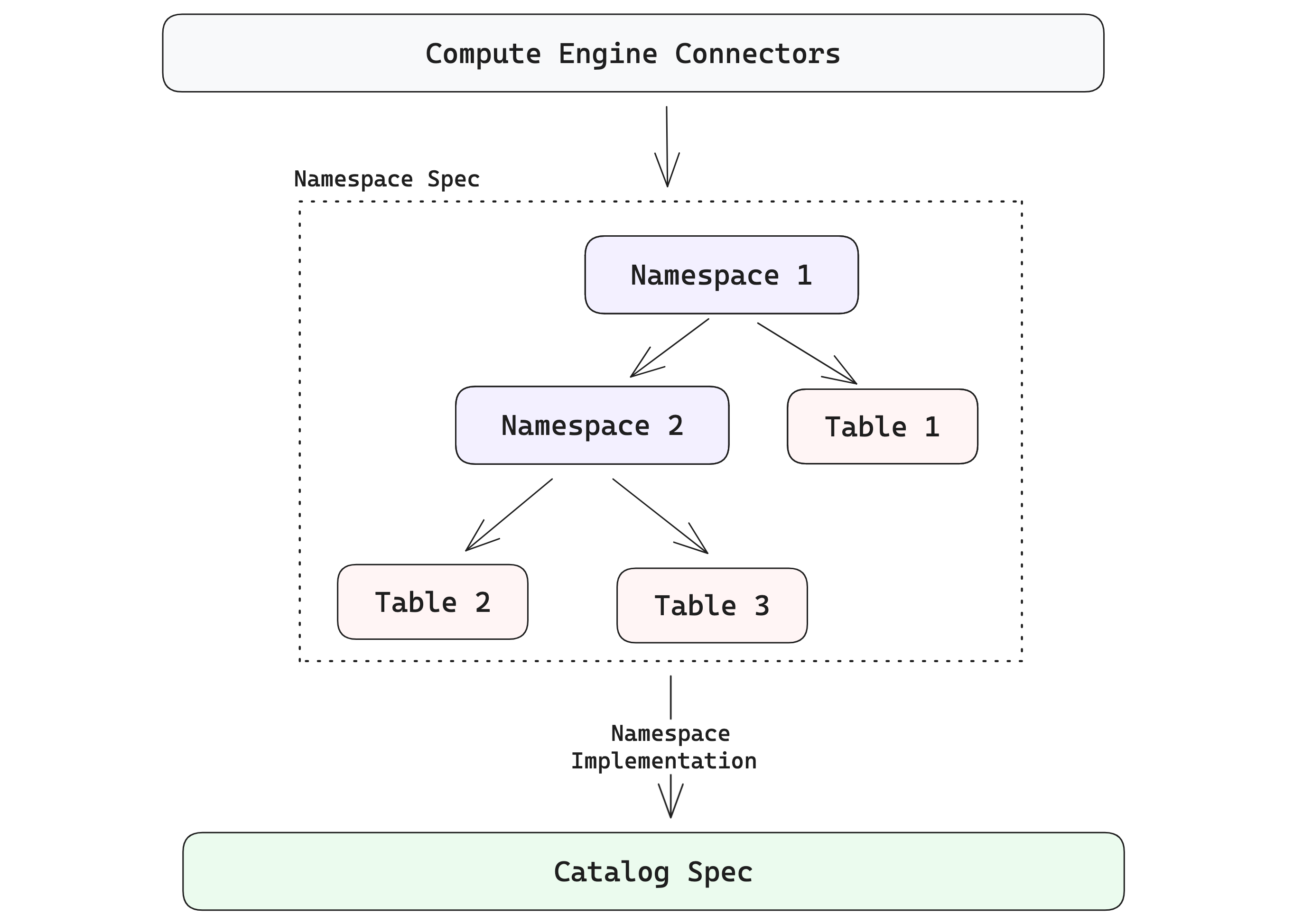
Before diving into examples, it helps to keep two terms in mind: the namespace client is the abstraction that presents a consistent namespace API, while the namespace implementation is the concrete backend that resolves namespaces and table locations (for example, a local directory or an external catalog). If you want to go deeper, see the Lance format namespace documentation.
Namespace paths and names
A namespace path is a list of components. For example, ["prod", "search"] means the search namespace inside the prod namespace. The empty path, [], means the root namespace.
Each component is a name, not a filesystem path segment, and can't be empty. Keep each one to letters, numbers, underscores, hyphens, and periods, so the same identifier is usable everywhere: a local directory namespace accepts other characters too, but other namespace implementations and deployments can refuse them. Naming rules has the lengths and the other limits.
Directory namespaces
The simplest namespace model in LanceDB is a single root namespace, often represented by one directory. Namespaces can nest inside it, as in this hierarchy:
bash
./local_lancedb (root)
└── prod
    └── search
        └── user   (table)
            └── data   (table)
The hierarchy is logical, not a tree of folders: a directory namespace records it in a __manifest table in the root directory, and stores each table in a directory of its own there.
As a user of LanceDB Embedded, you might never notice namespaces at first, because a plain connection uses only the root namespace, which is implicit. Connecting to this namespace is as simple as connecting to the namespace root:
python
# Connect to the directory namespace root
db = lancedb.connect("./local_lancedb")
typescript
import * as lancedb from "@lancedb/lancedb";

// Connect to the directory namespace root
const db = await lancedb.connect("./local_lancedb");
rust
use lancedb::connect;

// Connect to the directory namespace root
let db = connect("./local_lancedb").execute().await?;
A table created through this connection is stored directly under that path, as <name>.lance.
You can also explicitly connect to a namespace using lancedb.connect_namespace(...) with the directory namespace implementation:
python
# Local DirectoryNamespace root
# See https://lance.org/format/namespace/dir/catalog-spec/
db = lancedb.connect_namespace("dir", {"root": "./local_lancedb"})

table_name = "user"
data = [{"id": 1, "vector": [0.1, 0.2], "name": "alice"}]

table = db.create_table(table_name, data=data, mode="create")
print(f"Created table: {table.name}")
# Created table: user
typescript
import * as lancedb from "@lancedb/lancedb";

// Local DirectoryNamespace root
// See https://lance.org/format/namespace/dir/catalog-spec/
const db = await lancedb.connectNamespace("dir", { root: "./local_lancedb" });

const table = await db.createTable(
  "user",
  [{ id: 1, vector: [0.1, 0.2], name: "alice" }],
  { mode: "create" },
);
console.log(`Created table: ${table.name}`);
// Created table: user
rust
use std::collections::HashMap;
use std::sync::Arc;
use arrow_schema::{DataType, Field, Schema};

// Local DirectoryNamespace root
// See https://lance.org/format/namespace/dir/catalog-spec/
let mut properties = HashMap::new();
properties.insert("root".to_string(), "./local_lancedb".to_string());
let db = lancedb::connect_namespace("dir", properties)
    .execute()
    .await?;

let schema = Arc::new(Schema::new(vec![
    Field::new("id", DataType::Int64, false),
]));
let table = db
    .create_empty_table("user", schema)
    .execute()
    .await?;
println!("Created table: {}", table.name());
// Created table: user
说明
- For simple use cases in LanceDB Embedded, you don't need to go too deep into namespaces.
- To integrate LanceDB with external catalogs, understand how each namespace implementation resolves table names and locations in your organization's setup.
Remote or external catalog namespaces
The example above showed local directory-based namespaces. LanceDB also supports namespaces backed by remote object stores and external catalogs, via the REST namespace implementation.
For remote object stores with central metadata or catalog services (either commercial or open source), use the REST namespace implementation. It is backed by REST routes (for example POST /v1/namespace/{id}/create and GET /v1/namespace/{id}/list) and server-provided table locations.
For authentication, any property prefixed with headers is forwarded as an HTTP header (for example headers.Authorization becomes Authorization, and headers.X-API-Key becomes X-API-Key). LanceDB Enterprise REST requests use the x-api-key header for API-key authentication. Deployments that route multiple databases through the same endpoint can also use headers such as x-lancedb-database or x-lancedb-database-prefix for database context.
Replace the catalog URL and credential placeholders below with your values. In application code, load credentials from environment variables or a secrets manager.
python
# Remote RestNamespace root
# See https://lance.org/format/namespace/rest/catalog-spec/
db = lancedb.connect_namespace(
    "rest",
    {
        "uri": "https://<your_catalog>.internal.<your_org>.com",
        "headers.x-api-key": "your-api-key",
        # or:
        # "headers.Authorization": "Bearer your-access-token",
    },
)
typescript
import * as lancedb from "@lancedb/lancedb";

// Remote RestNamespace root
// See https://lance.org/format/namespace/rest/catalog-spec/
const db = await lancedb.connectNamespace("rest", {
  uri: "https://<your_catalog>.internal.<your_org>.com",
  headers: {
    "x-api-key": "your-api-key",
    // or:
    // Authorization: "Bearer your-access-token",
  },
});
rust
use std::collections::HashMap;

// Remote RestNamespace root
// See https://lance.org/format/namespace/rest/catalog-spec/
let mut properties = HashMap::new();
properties.insert(
    "uri".to_string(),
    "https://<your_catalog>.internal.<your_org>.com".to_string(),
);
properties.insert(
    "headers.x-api-key".to_string(),
    "your-api-key".to_string(),
);
// or:
// properties.insert(
//     "headers.Authorization".to_string(),
//     "Bearer your-access-token".to_string(),
// );
let db = lancedb::connect_namespace("rest", properties)
    .execute()
    .await?;
LanceDB Enterprise operates a REST namespace server on top of the Lance format, so any REST client that can speak the REST namespace API contract can be used to interact with it. It does not serve the contract's exists routes, so existence checks made through a direct REST namespace client fail against it. Python remote connections created with lancedb.connect("db://...") or lancedb.connect_async("db://...") support namespace_exists and table_exists through the existing describe routes instead. For authentication examples in LanceDB Enterprise, visit the Namespaces in SDKs page.
Best practices
Below, we list some best practices for working with namespaces:
- For simple use cases and single, stand-alone applications, the directory-based root namespace is sufficient and requires no special configuration.
- For remote storage locations, introduce explicit namespaces when multiple teams, environments, or domains share the same catalog.
- Treat namespace paths as stable identifiers (for example
"prod/search","staging/recs"). - For maintainability reasons, avoid hard-coding object-store table paths in application code. Instead, prefer catalog identifiers + namespaces.
Table operations with namespace paths
Let's imagine a scenario where your table management needs have evolved, and you now have the following multi-level structure to organize your tables outside the root namespace.
./local_lancedb (root)
└── prod
    └── search
        └── user   (table)
            └── data   (table)
    └── recommendations
        └── user   (table)
            └── data   (data)
Below, we show how you would express table operations within that namespace. Each item in the namespace list (["prod", "search"]) represents a level in the namespace hierarchy, and the table name is specified when you create, open, list, or drop it.
The SDK methods expose the namespace path in the idiom of each language:
- Python: pass
namespace_path=["prod", "search"]to table operations. - Rust: call builder methods such as
.namespace(vec!["prod".to_string(), "search".to_string()]). - TypeScript: pass a
namespacePatharray, for exampleawait db.openTable("user", ["prod", "search"]).
python
import lancedb

db = lancedb.connect_namespace("dir", {"root": "./local_lancedb"})

# Create namespace tree: prod/search
db.create_namespace(["prod"], mode="exist_ok")
db.create_namespace(["prod", "search"], mode="exist_ok")
db.create_namespace(["prod", "recommendations"], mode="exist_ok")

db.create_table(
    "user",
    data=[{"id": 1, "vector": [0.1, 0.2], "name": "alice"}],
    namespace_path=["prod", "search"],
    mode="create",  # use "overwrite" only if you want to replace existing table
)

db.create_table(
    "user",
    data=[{"id": 2, "vector": [0.3, 0.4], "name": "bob"}],
    namespace_path=["prod", "recommendations"],
    mode="create",  # use "overwrite" only if you want to replace existing table
)

# Verify: listings return a response with the names and a page token
print(db.list_namespaces().namespaces)  # ['prod']
print(db.list_namespaces(namespace_path=["prod"]).namespaces)
# ['recommendations', 'search']
print(db.list_tables(namespace_path=["prod", "search"]).tables)  # ['user']
print(db.list_tables(namespace_path=["prod", "recommendations"]).tables)  # ['user']
typescript
async function collectNames(items: AsyncIterable<string>): Promise<string[]> {
  const names: string[] = [];
  for await (const name of items) names.push(name);
  return names;
}

const db = await lancedb.connectNamespace("dir", { root: "./local_lancedb" });

// Create namespace tree: prod/search and prod/recommendations
await db.createNamespace(["prod"], { mode: "exist_ok" });
await db.createNamespace(["prod", "search"], { mode: "exist_ok" });
await db.createNamespace(["prod", "recommendations"], { mode: "exist_ok" });

await db.createTable(
  "user",
  [{ id: 1, vector: [0.1, 0.2], name: "alice" }],
  ["prod", "search"],
  { mode: "create" }, // use "overwrite" only if you want to replace existing table
);

await db.createTable(
  "user",
  [{ id: 2, vector: [0.3, 0.4], name: "bob" }],
  ["prod", "recommendations"],
  { mode: "create" },
);

// Verify
console.log(await collectNames(db.listNamespaces())); // ["prod"]
console.log(await collectNames(db.listNamespaces(["prod"]))); // ["recommendations", "search"]
console.log(await db.tableNames(["prod", "search"])); // ["user"]
console.log(await db.tableNames(["prod", "recommendations"])); // ["user"]
rust
let conn = connect(uri).execute().await?;
let search_namespace = vec!["prod".to_string(), "search".to_string()];
let recommendations_namespace = vec!["prod".to_string(), "recommendations".to_string()];

let schema = std::sync::Arc::new(arrow_schema::Schema::new(vec![
    arrow_schema::Field::new("id", arrow_schema::DataType::Int64, false),
]));

conn.create_empty_table("user", schema.clone())
    .namespace(search_namespace.clone())
    .execute()
    .await?;

conn.create_empty_table("user", schema)
    .namespace(recommendations_namespace.clone())
    .execute()
    .await?;

let search_table_names = conn
    .table_names()
    .namespace(search_namespace)
    .execute()
    .await?;
let recommendation_table_names = conn
    .table_names()
    .namespace(recommendations_namespace)
    .execute()
    .await?;

println!("{search_table_names:?}"); // ["user"]
println!("{recommendation_table_names:?}"); // ["user"]
说明
Using namespaces is optional in LanceDB, and most basic use cases do not require to work with them. An empty namespace ([]), which is the default, means the root namespace, whose tables are stored directly under the specified root path.
Namespace management APIs
You can open/create/drop tables inside a namespace path (like ["prod", "search"]). All three SDKs expose namespace lifecycle operations directly. In Python, use lancedb.connect_namespace(...) when calling namespace lifecycle methods such as create_namespace, list_namespaces, describe_namespace, and drop_namespace. In TypeScript, use lancedb.connectNamespace(...) and call createNamespace, listNamespaces, describeNamespace, and dropNamespace on the returned Connection. In Rust, use lancedb::connect_namespace(...) and call create_namespace, list_namespaces, and drop_namespace.
python
import lancedb

db = lancedb.connect_namespace("dir", {"root": "./local_lancedb"})
namespace = ["prod", "search"]

db.create_namespace(["prod"])
db.create_namespace(["prod", "search"])

child_namespaces = db.list_namespaces(namespace_path=["prod"]).namespaces
print(f"Child namespaces under ['prod']: {child_namespaces}")
# Child namespaces under ['prod']: ['search']

metadata = db.describe_namespace(["prod", "search"])
print(f"Metadata for namespace {namespace}: {metadata}")
# Metadata for namespace ['prod', 'search']: properties=None

db.drop_namespace(["prod", "search"], mode="skip")
db.drop_namespace(["prod"], mode="skip")
typescript
async function collectNames(items: AsyncIterable<string>): Promise<string[]> {
  const names: string[] = [];
  for await (const name of items) names.push(name);
  return names;
}

const db = await lancedb.connectNamespace("dir", { root: "./local_lancedb" });
const namespace = ["prod", "search"];

await db.createNamespace(["prod"]);
await db.createNamespace(["prod", "search"]);

const childNamespaces = await collectNames(db.listNamespaces(["prod"]));
console.log(
  `Child namespaces under ${JSON.stringify(namespace)}:`,
  childNamespaces,
);
// Child namespaces under ["prod","search"]: [ 'search' ]

const metadata = await db.describeNamespace(["prod", "search"]);
console.log(`Metadata for namespace ${JSON.stringify(namespace)}:`, metadata);

await db.dropNamespace(["prod", "search"], { mode: "skip" });
await db.dropNamespace(["prod"], { mode: "skip" });
rust
let mut properties = std::collections::HashMap::new();
properties.insert("root".to_string(), "./local_lancedb".to_string());
let db = lancedb::connect_namespace("dir", properties).execute().await?;
let namespace = vec!["prod".to_string(), "search".to_string()];

db.create_namespace(lance_namespace::models::CreateNamespaceRequest {
    id: Some(vec!["prod".to_string()]),
    ..Default::default()
})
.await?;
db.create_namespace(lance_namespace::models::CreateNamespaceRequest {
    id: Some(namespace.clone()),
    ..Default::default()
})
.await?;

let child_namespaces = db
    .list_namespaces(lance_namespace::models::ListNamespacesRequest {
        id: Some(vec!["prod".to_string()]),
        ..Default::default()
    })
    .await?;
println!(
    "Child namespaces under {:?}: {:?}",
    namespace, child_namespaces
);
// Child namespaces under ["prod", "search"]: ["search"]

db.drop_namespace(lance_namespace::models::DropNamespaceRequest {
    id: Some(namespace.clone()),
    ..Default::default()
})
.await?;
db.drop_namespace(lance_namespace::models::DropNamespaceRequest {
    id: Some(vec!["prod".to_string()]),
    ..Default::default()
})
.await?;
Namespace creation and deletion have modes that control what happens when the target already exists, doesn't exist, or contains data:
- Create mode:
createfails if the namespace already exists,exist_okkeeps the existing namespace, andoverwritereplaces it. - Drop mode:
failreports an error when the namespace doesn't exist, andskiptreats a missing namespace as a successful no-op. - Drop behavior:
restrictkeeps non-empty namespaces from being dropped, andcascadedrops child namespaces and tables first.
Namespace path components can't be empty, and are best kept to letters, numbers, underscores, hyphens, and periods, as above.
Listing APIs return the immediate children of the requested namespace path. Use limit with the returned page_token to page through large catalogs; pass an empty namespace path ([]) when you want to list from the root namespace. In Python, a listing returns a response: the names are in its namespaces or tables, and page_token is set when there is another page.
Namespaces in LanceDB Enterprise
In LanceDB Enterprise deployments, configure namespace-backed federated databases in a TOML file under your deployment's config directory. LanceDB Enterprise supports both directory-based (ns_impl = "dir") and REST-based (ns_impl = "rest") namespace implementations. The example below shows how to configure a directory-based namespace implementation in LanceDB Enterprise.
toml
# Federated database configuration for DirectoryNamespace
# This example uses minio storage
[federated_dbs.federated_dir_test]
ns_impl = "dir"
root = "s3://<your-deployment>/<your-dir>"
"storage.region" = "us-east-1"
"storage.endpoint" = "http://localhost:9000"
"storage.access_key_id" = "minioadmin"
"storage.secret_access_key" = "minioadmin"
"storage.allow_http" = "true"
# Far future expiration (year 2100)
"storage.expires_at_millis" = "4102444800000"
The example above uses MinIO, but the same approach applies to other cloud object storage platforms based on your deployment.
For REST-based namespace servers, you can specify the namespace implementation as "rest" with forwarding prefixed headers for authentication and context propagation.
toml
[federated_dbs.federated_rest_test]
ns_impl = "rest"
uri = "http://<your_org>.internal.catalog.com"
forward_header_prefixes = ["X-forward"]
With forward_header_prefixes = ["X-forward"], any incoming header starting with X-forward is forwarded to http://<your_org>.internal.catalog.com. This is useful for auth propagation, for example sending X-forward-authorization: Bearer xxxx.
For the LanceDB REST API itself, requests use x-api-key for API-key authentication. If your endpoint serves more than one database, LanceDB can also use headers such as x-lancedb-database or x-lancedb-database-prefix to route the request to the right database context.
Privileges
A namespace's USAGE, and the CREATE_TABLE, CREATE_VIEW, CREATE_MATERIALIZED_VIEW, CREATE_NAMESPACE, CREATE_SECRET, CREATE_STORAGE_INTEGRATION and CREATE_FUNCTION privileges for what it can hold, are granted through the REST ACL API or SQL GRANT/REVOKE:
sql
GRANT CREATE NAMESPACE, CREATE TABLE, CREATE VIEW ON SCHEMA platform TO ROLE writersSee Privileges for the full statement syntax and every target it reaches.